 Burndown
Will you hit the limit before the reset?
Your AI assistant tells you how much you've used and when the window resets — but never does the division. Burndown annotates that usage panel with the math. Works on Claude today, with more assistants on the way.
Free · works on Claude today — open Settings → Usage once and it takes over
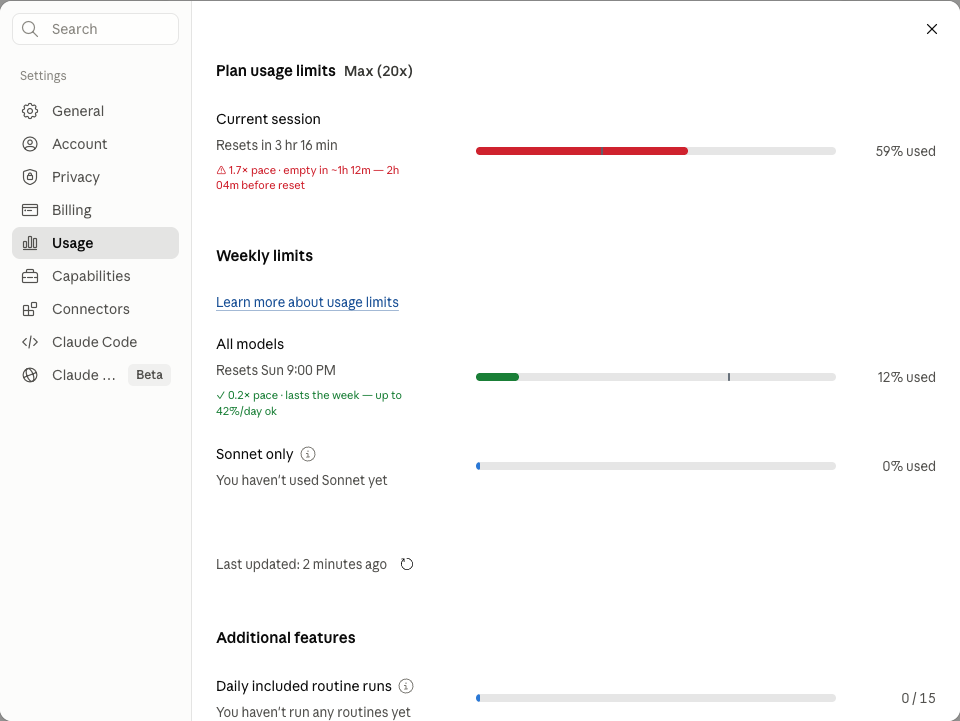
Four honest annotations, zero new UI
Bar recolor
Green if your pace outlasts the reset, amber for a close call, red when you're projected to lock out early.
Even-pace marker
A tick showing where usage should be right now. Fill past the tick means you're running hot.
Plain-words caption
⚠ 1.7× pace · empty in ~1h 12m — 2h 04m before reset — or the green variant with the max rate you can sustain.
Toolbar badge
Projected session runway (3h06) refreshed every minute, even with the page closed. Gray when stale, cleared after reset.
One snapshot is all the math needs
Limit windows are fixed length — on Claude, a session is 5 hours and the weekly limits are 7 days. So the panel's own two numbers determine everything:
- Projections are "at current pace", never promises. Usage is bursty; the extension says what happens if the pace holds.
- No numbers until they mean something. Early in a window, integer rounding makes projections garbage — they stay hidden until enough has elapsed.
- Recent rate beats session average. Once there's enough history, a trailing-window burn rate replaces the whole-window average.
- Stale data says so. Captions carry an "as of 12m ago" stamp; the badge turns gray rather than pretending.
Everything stays on your device. The extension reads the numbers the page already shows you, keeps a short local history, and makes zero network requests — nothing collected, nothing transmitted, nothing sold. Read the policy.
Get it
The extension is awaiting Chrome Web Store review — the one-click install link will appear here the moment it's approved.
- Install from the Chrome Web Store (link coming — review pending).
- On Claude, open Settings → Usage once, so it can take its first reading.
- That's it. The panel gets its annotations, and the toolbar badge keeps projecting your session runway from there.